In danger right now? Call 911 Childhelp National Child Abuse Hotline 1-800-422-4453 Report abuse in your state

Useful on screen.
Ready for the kitchen table.

Four free one-page resources to use with your family, classroom, or community group. Each prints on ordinary letter paper, in color or black and white, and ends with where to get help. No signup needed.

Families · 15–20 minutes

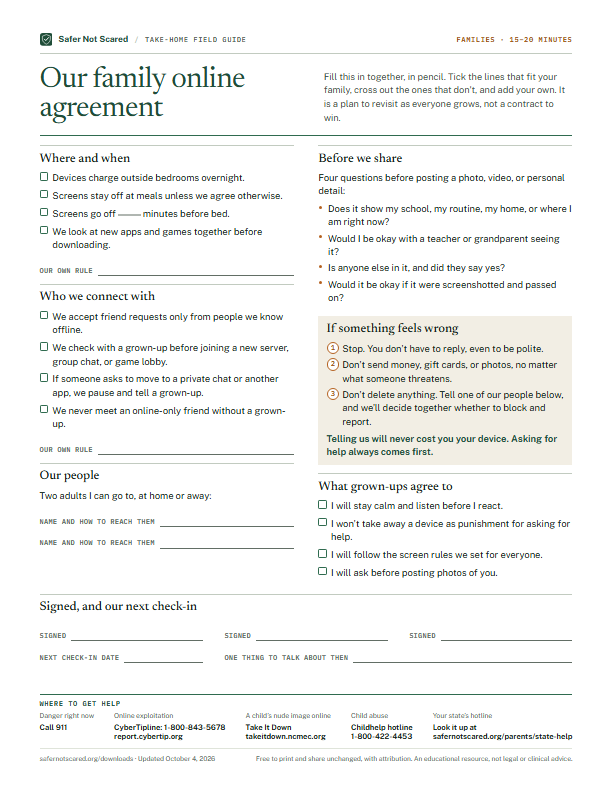
Our family online agreement

A one-page plan to fill in together: where devices live, who we talk to, what we share, and what happens when something feels wrong.

Inside: Where and when · Who we connect with · Our people · Before we share · If something feels wrong · What grown-ups agree to · Signed, and our next check-in

Download the PDF · 167 KB ↓
Read the full text

Fill this in together, in pencil. Tick the lines that fit your family, cross out the ones that don’t, and add your own. It is a plan to revisit as everyone grows, not a contract to win.

Where and when

  • Devices charge outside bedrooms overnight.
  • Screens stay off at meals unless we agree otherwise.
  • Screens go off ____ minutes before bed.
  • We look at new apps and games together before downloading.
  • Our own rule: ____

Who we connect with

  • We accept friend requests only from people we know offline.
  • We check with a grown-up before joining a new server, group chat, or game lobby.
  • If someone asks to move to a private chat or another app, we pause and tell a grown-up.
  • We never meet an online-only friend without a grown-up.
  • Our own rule: ____

Our people

Two adults I can go to, at home or away:

  • Name and how to reach them: ____
  • Name and how to reach them: ____

Before we share

Four questions before posting a photo, video, or personal detail:

  • Does it show my school, my routine, my home, or where I am right now?
  • Would I be okay with a teacher or grandparent seeing it?
  • Is anyone else in it, and did they say yes?
  • Would it be okay if it were screenshotted and passed on?

If something feels wrong

  1. Stop. You don’t have to reply, even to be polite.
  2. Don’t send money, gift cards, or photos, no matter what someone threatens.
  3. Don’t delete anything. Tell one of our people below, and we’ll decide together whether to block and report.

Telling us will never cost you your device. Asking for help always comes first.

What grown-ups agree to

  • I will stay calm and listen before I react.
  • I won’t take away a device as punishment for asking for help.
  • I will follow the screen rules we set for everyone.
  • I will ask before posting photos of you.

Signed, and our next check-in

  • Signed: ____
  • Signed: ____
  • Signed: ____
  • Next check-in date: ____
  • One thing to talk about then: ____

Where to get help

  • Danger right now: Call 911
  • Online exploitation: CyberTipline: 1-800-843-5678 — report.cybertip.org
  • A child’s nude image online: Take It Down — takeitdown.ncmec.org
  • Child abuse: Childhelp hotline — 1-800-422-4453
  • Your state’s hotline: State-by-state list — safernotscared.org/parents/state-help
Parents & caregivers · 20 minutes per app

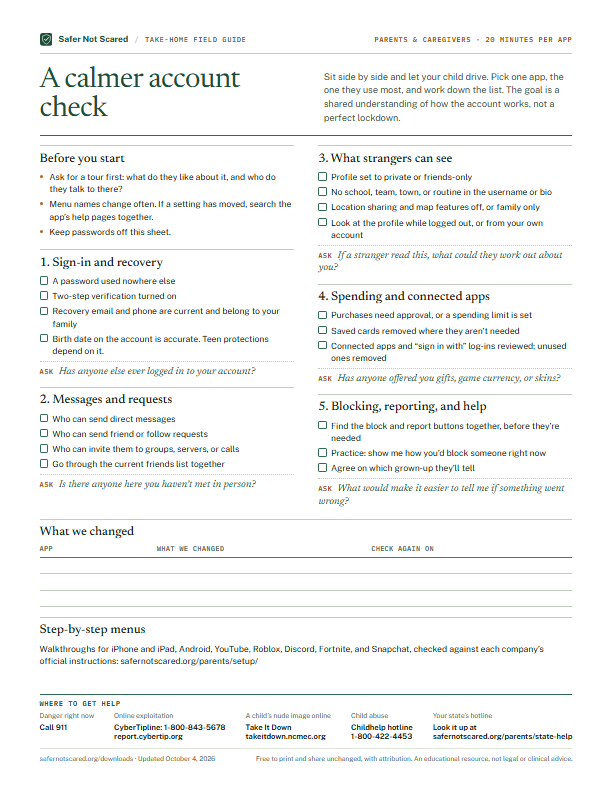
A calmer account check

Five settings worth reviewing with your child on any app or game, with what to look for, a question to ask, and a log of what you changed.

Inside: Before you start · Sign-in and recovery · Messages and requests · What strangers can see · Spending and connected apps · Blocking, reporting, and help · What we changed · Step-by-step menus

Download the PDF · 188 KB ↓
Read the full text

Sit side by side and let your child drive. Pick one app, the one they use most, and work down the list. The goal is a shared understanding of how the account works, not a perfect lockdown.

Before you start

  • Ask for a tour first: what do they like about it, and who do they talk to there?
  • Menu names change often. If a setting has moved, search the app’s help pages together.
  • Keep passwords off this sheet.

1. Sign-in and recovery

  • A password used nowhere else
  • Two-step verification turned on
  • Recovery email and phone are current and belong to your family
  • Birth date on the account is accurate. Teen protections depend on it.

Ask: Has anyone else ever logged in to your account?

2. Messages and requests

  • Who can send direct messages
  • Who can send friend or follow requests
  • Who can invite them to groups, servers, or calls
  • Go through the current friends list together

Ask: Is there anyone here you haven’t met in person?

3. What strangers can see

  • Profile set to private or friends-only
  • No school, team, town, or routine in the username or bio
  • Location sharing and map features off, or family only
  • Look at the profile while logged out, or from your own account

Ask: If a stranger read this, what could they work out about you?

4. Spending and connected apps

  • Purchases need approval, or a spending limit is set
  • Saved cards removed where they aren’t needed
  • Connected apps and “sign in with” log-ins reviewed; unused ones removed

Ask: Has anyone offered you gifts, game currency, or skins?

5. Blocking, reporting, and help

  • Find the block and report buttons together, before they’re needed
  • Practice: show me how you’d block someone right now
  • Agree on which grown-up they’ll tell

Ask: What would make it easier to tell me if something went wrong?

What we changed

AppWhat we changedCheck again on

Step-by-step menus

Walkthroughs for iPhone and iPad, Android, YouTube, Roblox, Discord, Fortnite, and Snapchat, checked against each company’s official instructions: safernotscared.org/parents/setup/

Where to get help

  • Danger right now: Call 911
  • Online exploitation: CyberTipline: 1-800-843-5678 — report.cybertip.org
  • A child’s nude image online: Take It Down — takeitdown.ncmec.org
  • Child abuse: Childhelp hotline — 1-800-422-4453
  • Your state’s hotline: State-by-state list — safernotscared.org/parents/state-help
Educators · 10 minutes at home

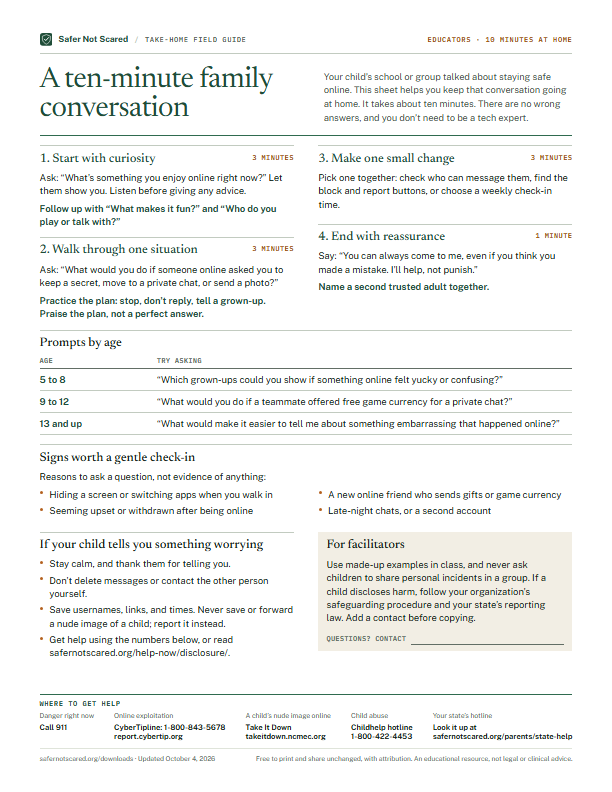
A ten-minute family conversation

A take-home sheet for schools and community groups: a timed, four-part conversation for families, prompts by age, and what to do if a child shares something worrying.

Inside: Start with curiosity · Walk through one situation · Make one small change · End with reassurance · Prompts by age · Signs worth a gentle check-in · If your child tells you something worrying · For facilitators

Download the PDF · 179 KB ↓
Read the full text

Your child’s school or group talked about staying safe online. This sheet helps you keep that conversation going at home. It takes about ten minutes. There are no wrong answers, and you don’t need to be a tech expert.

1. Start with curiosity · 3 minutes

Ask: “What’s something you enjoy online right now?” Let them show you. Listen before giving any advice.

Follow up with “What makes it fun?” and “Who do you play or talk with?”

2. Walk through one situation · 3 minutes

Ask: “What would you do if someone online asked you to keep a secret, move to a private chat, or send a photo?”

Practice the plan: stop, don’t reply, tell a grown-up. Praise the plan, not a perfect answer.

3. Make one small change · 3 minutes

Pick one together: check who can message them, find the block and report buttons, or choose a weekly check-in time.

4. End with reassurance · 1 minute

Say: “You can always come to me, even if you think you made a mistake. I’ll help, not punish.”

Name a second trusted adult together.

Prompts by age

AgeTry asking
5 to 8“Which grown-ups could you show if something online felt yucky or confusing?”
9 to 12“What would you do if a teammate offered free game currency for a private chat?”
13 and up“What would make it easier to tell me about something embarrassing that happened online?”

Signs worth a gentle check-in

Reasons to ask a question, not evidence of anything:

  • Hiding a screen or switching apps when you walk in
  • A new online friend who sends gifts or game currency
  • Seeming upset or withdrawn after being online
  • Late-night chats, or a second account

If your child tells you something worrying

  • Stay calm, and thank them for telling you.
  • Don’t delete messages or contact the other person yourself.
  • Save usernames, links, and times. Never save or forward a nude image of a child; report it instead.
  • Get help using the numbers below, or read safernotscared.org/help-now/disclosure/.

For facilitators

Use made-up examples in class, and never ask children to share personal incidents in a group. If a child discloses harm, follow your organization’s safeguarding procedure and your state’s reporting law. Add a contact before copying.

  • Questions? Contact: ____

Where to get help

  • Danger right now: Call 911
  • Online exploitation: CyberTipline: 1-800-843-5678 — report.cybertip.org
  • A child’s nude image online: Take It Down — takeitdown.ncmec.org
  • Child abuse: Childhelp hotline — 1-800-422-4453
  • Your state’s hotline: State-by-state list — safernotscared.org/parents/state-help
Families · 2 minutes a card

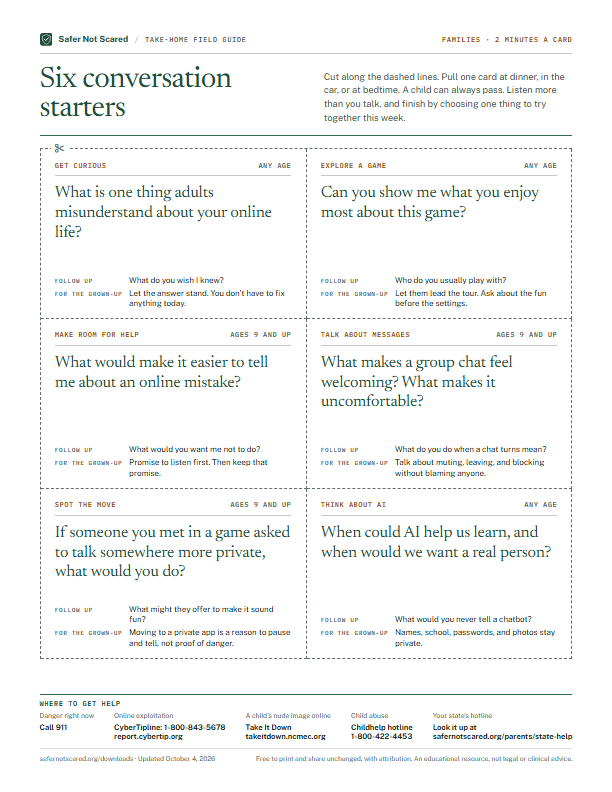
Six conversation starters

Six cut-out cards, each with an opening question, a follow-up, and a tip for the grown-up asking.

Inside: Get curious · Explore a game · Make room for help · Talk about messages · Spot the move · Think about AI

Download the PDF · 166 KB ↓
Read the full text

Cut along the dashed lines. Pull one card at dinner, in the car, or at bedtime. A child can always pass. Listen more than you talk, and finish by choosing one thing to try together this week.

Get curious · Any age

What is one thing adults misunderstand about your online life?

Follow up: What do you wish I knew?

For the grown-up: Let the answer stand. You don’t have to fix anything today.

Explore a game · Any age

Can you show me what you enjoy most about this game?

Follow up: Who do you usually play with?

For the grown-up: Let them lead the tour. Ask about the fun before the settings.

Make room for help · Ages 9 and up

What would make it easier to tell me about an online mistake?

Follow up: What would you want me not to do?

For the grown-up: Promise to listen first. Then keep that promise.

Talk about messages · Ages 9 and up

What makes a group chat feel welcoming? What makes it uncomfortable?

Follow up: What do you do when a chat turns mean?

For the grown-up: Talk about muting, leaving, and blocking without blaming anyone.

Spot the move · Ages 9 and up

If someone you met in a game asked to talk somewhere more private, what would you do?

Follow up: What might they offer to make it sound fun?

For the grown-up: Moving to a private app is a reason to pause and tell, not proof of danger.

Think about AI · Any age

When could AI help us learn, and when would we want a real person?

Follow up: What would you never tell a chatbot?

For the grown-up: Names, school, passwords, and photos stay private.

Where to get help

  • Danger right now: Call 911
  • Online exploitation: CyberTipline: 1-800-843-5678 — report.cybertip.org
  • A child’s nude image online: Take It Down — takeitdown.ncmec.org
  • Child abuse: Childhelp hotline — 1-800-422-4453
  • Your state’s hotline: State-by-state list — safernotscared.org/parents/state-help

Created by Safer Not Scared · Updated October 4, 2026. Educational planning resources, not legal, clinical, or diagnostic tools. You may print and share them unchanged with attribution.

Prefer a plan you can work through?

Choose a topic and build three small steps for your family.

Try the family checkup